GeoServer Blog
GeoServer Security Update - September 2026
This post provides a recap of the security advisories published over the summer of 2026, covering recently published Common Vulnerability and Exploits (CVE), along with a supply chain advisory affecting the GeoServer project. This activity has resulted in an update to our security policy covering AI-assisted vulnerability reports.
If you are responsible for a GeoServer instance, the short version is: please update to GeoServer 3.0.1, GeoServer 2.28.5, or GeoServer 2.27.6.
The GeoServer project follows a coordinated vulnerability disclosure policy: vulnerabilities are fixed for both stable and maintenance releases, prior to CVE details being published. The goal is to give everyone an opportunity to update prior to public disclosure.
August zero-day
In August GeoServer experienced a zero-day vulnerability (an exploit in the wild with no known fix). The problem had already been reported privately by several independent researchers, and a fix scheduled for the GeoServer 3.0.1 release.
The zero-day situation arose because a third party (unconnected to the project or to the researchers who had reported the issue) disclosed the vulnerability publicly on social media. The effect was immediately evident, with scans for this vulnerability detected within hours of the public social media post.
The speed of this response was remarkable and resulted in news coverage and an urgent call to update on our user forum. We would like to thank the reporter Ravie Lakshmanan who first notified project leadership via the Open Source Geospatial Foundation.
GeoServer 3.0.1, GeoServer 2.28.5, and GeoServer 2.27.6:
-
CVE-2026-76904 Unauthenticated PostGIS SQL injection in the
jsonArrayContainsfilter function (Critical)This releases addresses the GeoTools CVE-2026-76904 SQL Injection vulnerability that: requires a Text or JSON column; affects PostGIS 12 and up.
This experience reaffirms the importance of following the coordinated vulnerability disclosure policy, and asking everyone to update when new releases are made available.
Previously published CVEs
The following CVEs were published on June 11, 2026, alongside the GeoServer 3.0.0 release.
GeoServer 2.27.3, and 2.26.4:
-
CVE-2025-58175 Server-Side Request Forgery (SSRF) Vulnerability in XML entity resolution (Medium)
-
CVE-2025-52465 Arbitrary file write vulnerability in Master Password Dump Page (High)
GeoServer 2.27.0:
-
CVE-2024-45747 Server-Side Template Injection (SSTI) vulnerability in processing FreeMarker templates (High)
-
CVE-2025-27511 JNDI Vulnerability in DB2 Store Connection (High)
Supply chain advisory
Supply chain advisories have the possibility to affect the integrity of the software you download:
-
GHSA-cpc9-c4h3-2jwx GitHub Actions workflow in GeoServer Cloud (April 2026)
A security researcher Aviv Donenfeld reported an issue in a geoserver-cloud repo GitHub actions workflow.
While GeoServer uses GitHub for source code management and quality assurance workflows, such workflows are not used to build or publish download artifacts. A review was made to confirm all pull requests during the time of vulnerability were by trusted parties, secrets were rotated, and the workflow issue was addressed.
This was first time the project has worked with an infrastructure advisory like this. We have marked the advisory as “geoserver/geoserver-cloud (GitHub Actions)” as it does not correspond with a release of GeoServer, and as a result does not qualify for a CVE number.
It is important to note that no GeoServer releases were affected. GeoServer releases are made using a Jenkins build server publishing artifacts to both SourceForge and OSGeo infrastructure.

AI-assisted vulnerability reports
Like many other software projects, we are experiencing a wave of vulnerability reports generated with AI assistance.
We have both established a general AI Policy, and updated our Security Policy, to acknowledge the use of these tools and provide guidance:
- The human reporter is responsible for verifying the issue is real and reproducible before submitting.
- Reports must include a working reproduction (code, request, or config) against a supported GeoServer series, not just a plausible-sounding description.
- Reports that turn out to be hallucinated or unverifiable will be closed without further engagement.
Especially with AI reports, which are often very verbose, being on hand to clarify is greatly appreciated.
These reports can take quite some time to review, or even determine when such reports are duplicates. It also helps if you are in a position to test and verify fixes as they are addressed. Anything we can do to make the work of the geoserver-security team easier will be of assistance.
Q: How can I help?
If your organization depends on GeoServer, please consider sponsoring the project, or have your staff directly participate in geoserver-security work.
We are also looking to establish project membership for public institutions facing restrictions on sponsorship and participation.
Q: How often should I upgrade GeoServer?
GeoServer operates with a time-boxed release cycle, maintaining “stable” and “maintenance” releases, over the course of a year.
- GeoServer 3.0.x is the current stable release
- GeoServer 2.28.x is the current maintenance release
Please upgrade to a supported release at least once a year to continue receiving security fixes. See the Upgrading existing versions (User Guide) for guidance.
Q: How do I report a vulnerability?
Please see our security policy for instructions on reporting vulnerabilities privately using GitHub security advisories.
GeoServer 3.0.1 Release
GeoServer 3.0.1 release is now available with downloads (bin, war, windows), along with docs and extensions.
This is a stable release of GeoServer recommended for production use. GeoServer 3.0.1 is made in conjunction with GeoTools 35.1, and GeoWebCache 2.0.1.
Thanks to Andrea Aime (GeoSolutions) and Jody Garnett (GeoCat) for making this release.
Security Considerations
This release addresses security vulnerabilities and is an urgent update for production systems.
-
CVE-2026-76904 Unauthenticated PostGIS SQL injection in the jsonArrayContains filter function (Critical)
This releases addresses the GeoTools CVE-2026-76904 SQL Injection vulnerability that: requires a Text or JSON column; affects PostGIS 12 and up.
We would like to thank those who reported the problem following our coordinated vulnerability disclosure policy; unfortunately the issue was subject to public disclosure prior to our intended release schedule.
The use of the CVE system allows the GeoServer team to reach a wider audience than blog posts. See project security policy for more information on how security vulnerabilities are managed.
Release notes
New Feature:
- GEOS-12158 Keycloak Role Service for use alongside OIDC Extension
Improvement:
- GEOS-12095 LDAP: conversion from group-member-username to user-search username
- GEOS-12124 Make GWC seeder thread pool sizes configurable via gwc-gs.xml and environment variables
- GEOS-12139 GSIP 241 - GeoWebCache Security-Aware Tile Caching
- GEOS-12140 Improve CoverageAccessLimits’s RasterFilter masking on SecureGridCoverage2DReader reading
- GEOS-12141 WMS nearest match machinery can issue queries that are guaranteed to return an empty result
- GEOS-12151 Allow caching small images used by ImageMosaic in memory
- GEOS-12154 Improve URL validation in SLD processing
- GEOS-12169 Update MapML viewer to v0.18.0
Bug:
- GEOS-11373 Geometry type mismatch in WFS 1.1.0
- GEOS-12144 “application/vnd.ogc.fg+json” output format fails when requesting non-geographical datasets
- GEOS-12145 Missing spatial filter in
GeoFenceAccessManagerSQL query when only CLIP is applied - GEOS-12146 Wrong CRS axis order used in
SecuredFeatureSourcewhen clipping features for WFS 2.0.0 requests - GEOS-12149 GeoServer WMTS capabilities put query parameters in the wrong place in generated URLs
- GEOS-12165 GeoServer does not start when fileLockProvider is set: lock wait times out
Sub-task:
For the complete list see 3.0.1 release notes.
Community Updates
Community module development:
- GEOS-12173 Remove the REST module profile from community modules as the module does not exist here
Community modules are shared as source code to encourage collaboration. If a topic being explored is of interest to you, please contact the module developer to offer assistance.
About GeoServer 3.0 Series
Additional information on GeoServer 3.0 series:
- GeoServer 3.0 User Manual
- GeoServer 3.0-RC, a crowdfunded success story
- GSIP-221 MkDocs Migration
- GSIP-226 GeoServer 3
- GSIP-233 Community Pending Profile
- GSIP-236 Lightening up the Core for GeoServer 3
- GSIP-238 UI / UX Refresh
- GSIP 239 Promote OIDC Community Module to Extension
GeoServer 2.28.5 Release
GeoServer 2.28.5 release is now available with downloads (bin, war, windows), along with docs and extensions.
This is a maintenance release of GeoServer providing existing installations with minor updates and bug fixes. GeoServer 2.28.5 is made in conjunction with GeoTools 34.5, and GeoWebCache 1.28.5.
Thanks to Andrea Aime (GeoSolutions) and Jody Garnett (GeoCat) for making this release.
Security Considerations
This release addresses security vulnerabilities and is an urgent update for production systems.
-
CVE-2026-76904 Unauthenticated PostGIS SQL injection in the jsonArrayContains filter function (Critical)
This releases addresses the GeoTools CVE-2026-76904 SQL Injection vulnerability that: requires a Text or JSON column; affects PostGIS 12 and up.
We would like to thank those who reported the problem following our coordinated vulnerability disclosure policy; unfortunately the issue was subject to public disclosure prior to our intended release schedule.
The use of the CVE system allows the GeoServer team to reach a wider audience than blog posts. See project security policy for more information on how security vulnerabilities are managed.
Release notes
Improvement:
- GEOS-12080 style edit: check image loads
- GEOS-12082 CoverageStore - quick fail for incorrect files
- GEOS-12095 LDAP: conversion from group-member-username to user-search username
- GEOS-12140 Improve CoverageAccessLimits’s RasterFilter masking on SecureGridCoverage2DReader reading
- GEOS-12141 WMS nearest match machinery can issue queries that are guaranteed to return an empty result
- GEOS-12151 Allow caching small images used by ImageMosaic in memory
Bug:
- GEOS-11373 Geometry type mismatch in WFS 1.1.0
- GEOS-11571 The geoserver-2.26.0-printing-plugin is missing some dependend libraries
- GEOS-12138 Improve DescribeDomains expandLimit validation
- GEOS-12145 Missing spatial filter in
GeoFenceAccessManagerSQL query when only CLIP is applied - GEOS-12146 Wrong CRS axis order used in
SecuredFeatureSourcewhen clipping features for WFS 2.0.0 requests - GEOS-12149 GeoServer WMTS capabilities put query parameters in the wrong place in generated URLs
- GEOS-12165 GeoServer does not start when fileLockProvider is set: lock wait times out
Task:
- GEOS-12137 Update OSHI from 6.8.2 to 7.3.0
- GEOS-12148 Update GetFeatureInfo to list features (rather than as a table)
Sub-task:
- GEOS-12153 Include description in AttributeMap
For the complete list see 2.28.5 release notes.
Community Updates
Community module development:
- GEOS-12129 Longitudinal profile positive altitude includes first elevation as ascent from zero
- GEOS-12173 Remove the REST module profile from community modules as the module does not exist here
Community modules are shared as source code to encourage collaboration. If a topic being explored is of interest to you, please contact the module developer to offer assistance.
About GeoServer 2.28 Series
Additional information on GeoServer 2.28 series:
- GeoServer 2.28 User Manual
- GeoServer 2025 Q4 Developer Update
- GSIP-234 Advertise and Enforce Attribute Restrictions
Release notes: ( 2.28.5 | 2.28.4 | 2.28.3 | 2.28.2 | 2.28.1 | 2.28.0 )
GeoServer 2.27.6 Release
GeoServer 2.27.6 release is now available with downloads (bin, war, windows), along with docs and extensions.
This series has previously reached end-of-life, with this release issued to address an urgent bug or security vulnerability. Please apply this update as a mitigation measure only, and plan to upgrade to a stable or maintenance release of GeoServer.
GeoServer 2.27.6 is made in conjunction with GeoTools 33.6.
Thanks to Andrea Aime (GeoSolutions) and Jody Garnett (GeoCat) for making this release.
Security Considerations
This release addresses security vulnerabilities and is an urgent update for production systems.
-
CVE-2026-76904 Unauthenticated PostGIS SQL injection in the jsonArrayContains filter function (Critical)
This releases addresses the GeoTools CVE-2026-76904 SQL Injection vulnerability that: requires a Text or JSON column; affects PostGIS 12 and up.
We would like to thank those who reported the problem following our coordinated vulnerability disclosure policy; unfortunately the issue was subject to public disclosure prior to our intended release schedule.
The use of the CVE system allows the GeoServer team to reach a wider audience than blog posts. See project security policy for more information on how security vulnerabilities are managed.
Release notes
Improvement:
- GEOS-12080 style edit: check image loads
- GEOS-12082 CoverageStore - quick fail for incorrect files
- GEOS-12095 LDAP: conversion from group-member-username to user-search username
Task:
For the complete list see 2.27.6 release notes.
Community Updates
Community module development:
- GEOS-12098 Rename JWT Header assembly so it is collected for nightly downloads
- GEOS-12101 Workspace styles not persisted to disk after restore
- GEOS-12129 Longitudinal profile positive altitude includes first elevation as ascent from zero
Community modules are shared as source code to encourage collaboration. If a topic being explored is of interest to you, please contact the module developer to offer assistance.
About GeoServer 2.27 Series
Additional information on GeoServer 2.27 series:
- GeoServer 2.27 User Manual
- CITE Certification achieved
- GeoServer 2025 Q2 Developer Update
- GeoServer 2025 Roadmap
- Content-Security-Policy Headers
- OGCAPI Features Extension
- File system access isolation
- Promote data dir catalog loader to core
Release notes: ( 2.27.6 | 2.27.5 | 2.27.4 | 2.27.3 | 2.27.2 | 2.27.1 | 2.27.0 )
GeoServer 3.0.0 Release
GeoServer 3.0.0 release is now available with downloads (bin, war, windows), along with docs and extensions.
This is a stable release of GeoServer 3.0.x series. GeoServer 3.0.0 is made in conjunction with GeoTools 35.0, and GeoWebCache 2.0.0.
Thanks to Andrea Aaime (GeoSolutions), Jody Garnett (GeoCat), and Peter Smythe (AfriGIS) for making this release.
Security Considerations
This release addresses security vulnerabilities and is an important upgrade for production systems.
- GEOS-12043 CVE-2025-27511 JNDI Vulnerability in DB2 Store Connection
- GEOS-11920 CVE-2025-58175 Server-Side Request Forgery (SSRF) Vulnerability in XML entity resolution
- GEOS-11918 CVE-2025-52465 Arbitrary file write vulnerability in Master Password Dump Page
- GEOS-11777 CVE-2024-45747 Server-Side Template Injection (SSTI) vulnerability in processing FreeMarker templates
The use of the CVE system allows the GeoServer team to reach a wider audience than blog posts.
See project security policy for more information on how security vulnerabilities are managed.
Welcome to GeoServer 3
We are overjoyed to share the initial release of GeoServer 3 with our community, this is the final stretch of a long road, a year of development, and a lot of planning and support to make it all happen. Thanks to all the organizations and individuals supporting GeoServer 3.
Straightforward upgrade
Special care has been taken to ensure a seamless upgrade from GeoServer 2.28.x:
-
Important: We have made no changes to the GeoServer Data Directory.
-
A few modules have migrated from core to extensions:
- WCS 1.0 and WCS 1.1
- World Image and ArcGRID raster data sources.
- KML output format
The pure Java
H2database is no longer provided. -
The log file location setting is now managed using the
GEOSERVER_LOG_LOCATIONapplication property. -
The NetCDF index support has been simplified and is now self-contained. With this improvement, NetCDF no longer needs a database or local
.idxfiles to operate.Instructions are provided for how to clean up these now unused files.
-
The new OIDC plugin is now available as a full extension.
This plugin takes over the responsibilities of the previously available
KeycloakandOAuth2plugins. For guidance on upgrading please see the detailed migration guide.
Please see the upgrade instructions for details.
Thanks to the GeoServer 3 Sponsors
GeoServer 3 would not exist without the organizations and individuals who supported the GeoServer 3 crowdfunding campaign. Their sponsorship made this work possible. We also want to share a final message to reflect over the campaign, its results, and thank again everyone that participate.
GeoServer 3 is supported by the following organisations:

































Individual donations: Abhijit Gujar, Hennessy Becerra, Ivana Ivanova, John Bryant, Jason Horning, Jose Macchi, Peter Smythe, Sajjadul Islam, Sebastiano Meier, Stefan Overkamp.
New Context-Driven User Experience
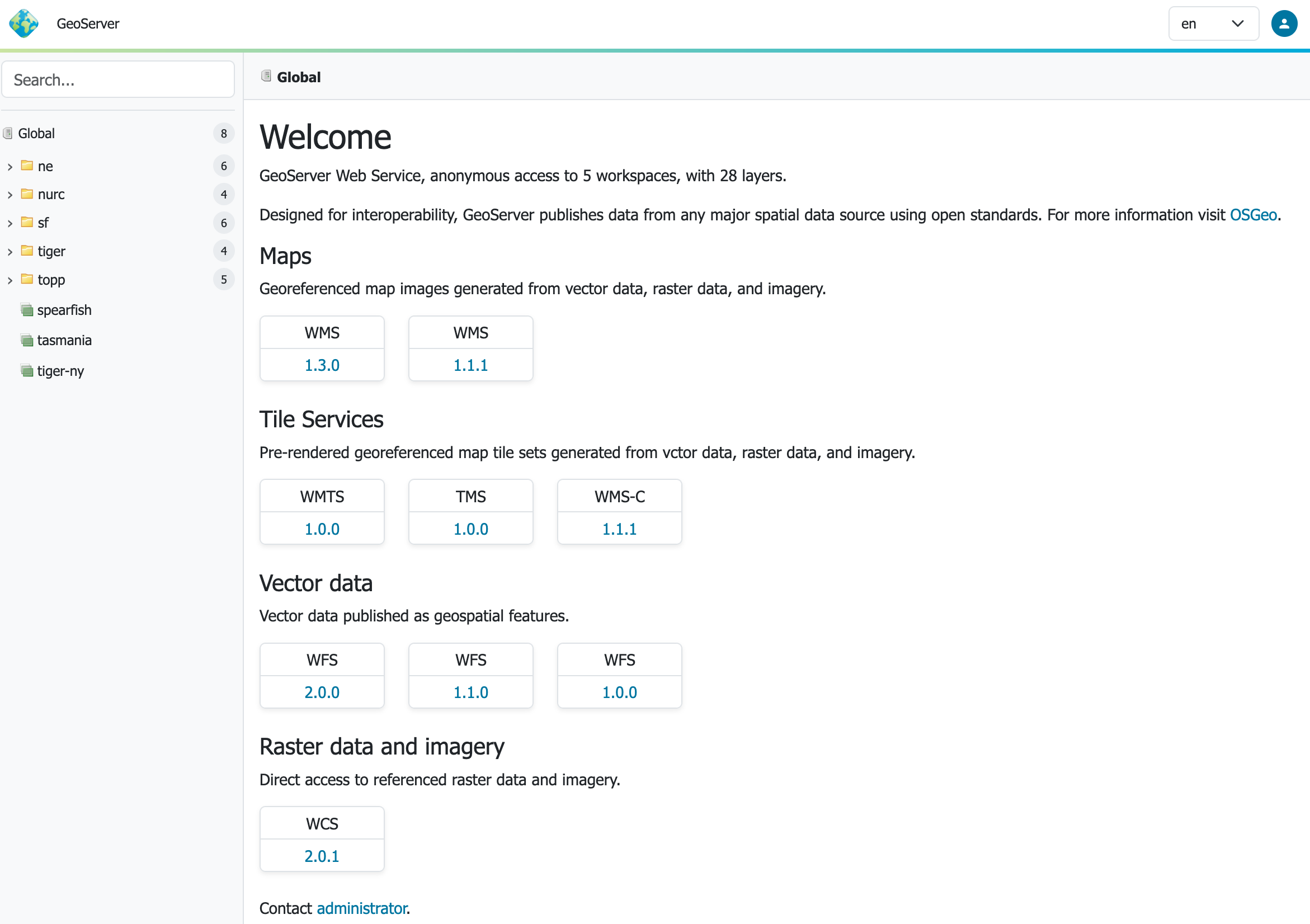
GeoServer 3 features a new “context-driven” user experience, which we really hope you enjoy.
-
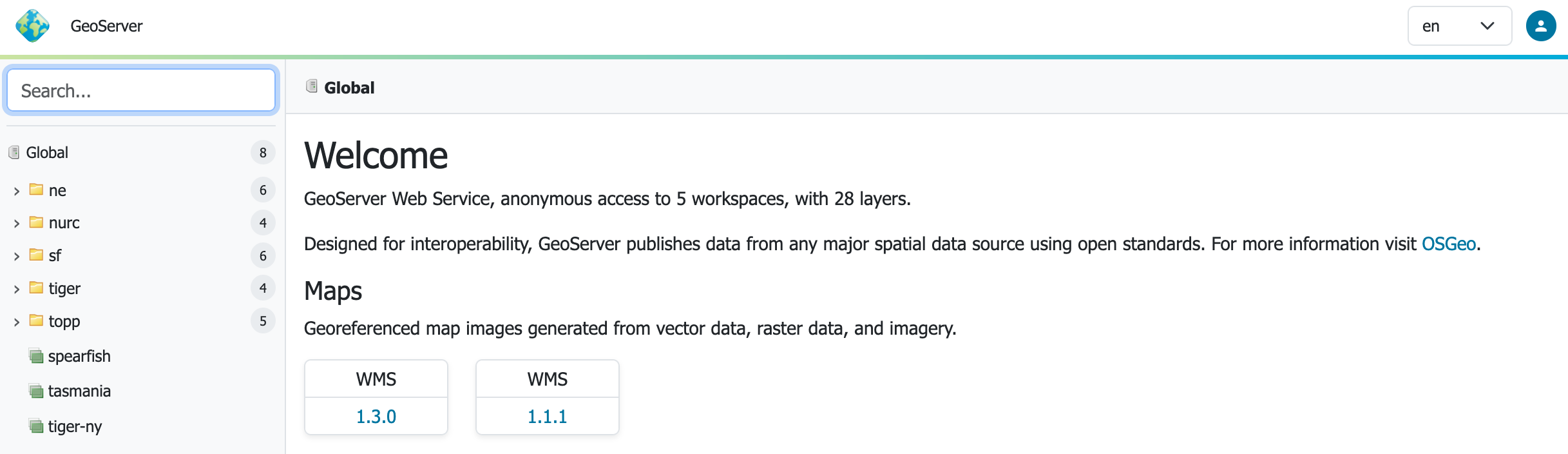
Search: Using the left hand side search field to find information. Autocomplete results are shown as you type, and results are listed in a tree which can be navigated below.
-
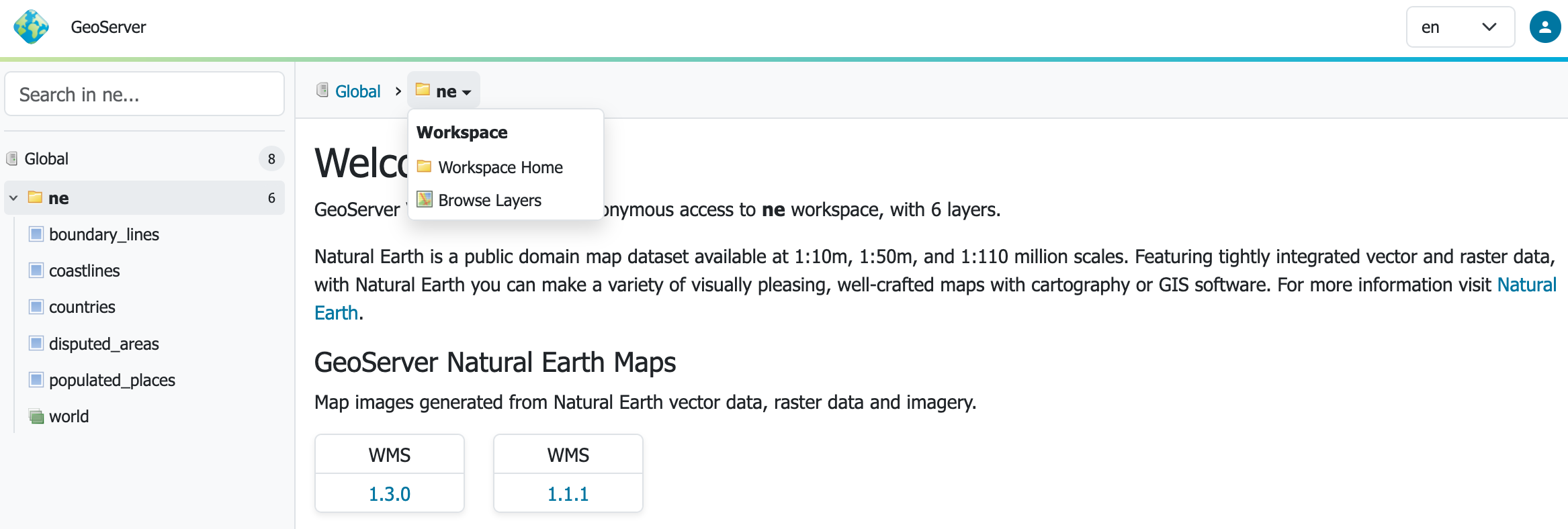
Context: Clicking on a search item establishes the context which is shown as breadcrumbs along the top of the page. A drop-down context menu provides quick access to actions that can be performed.
-
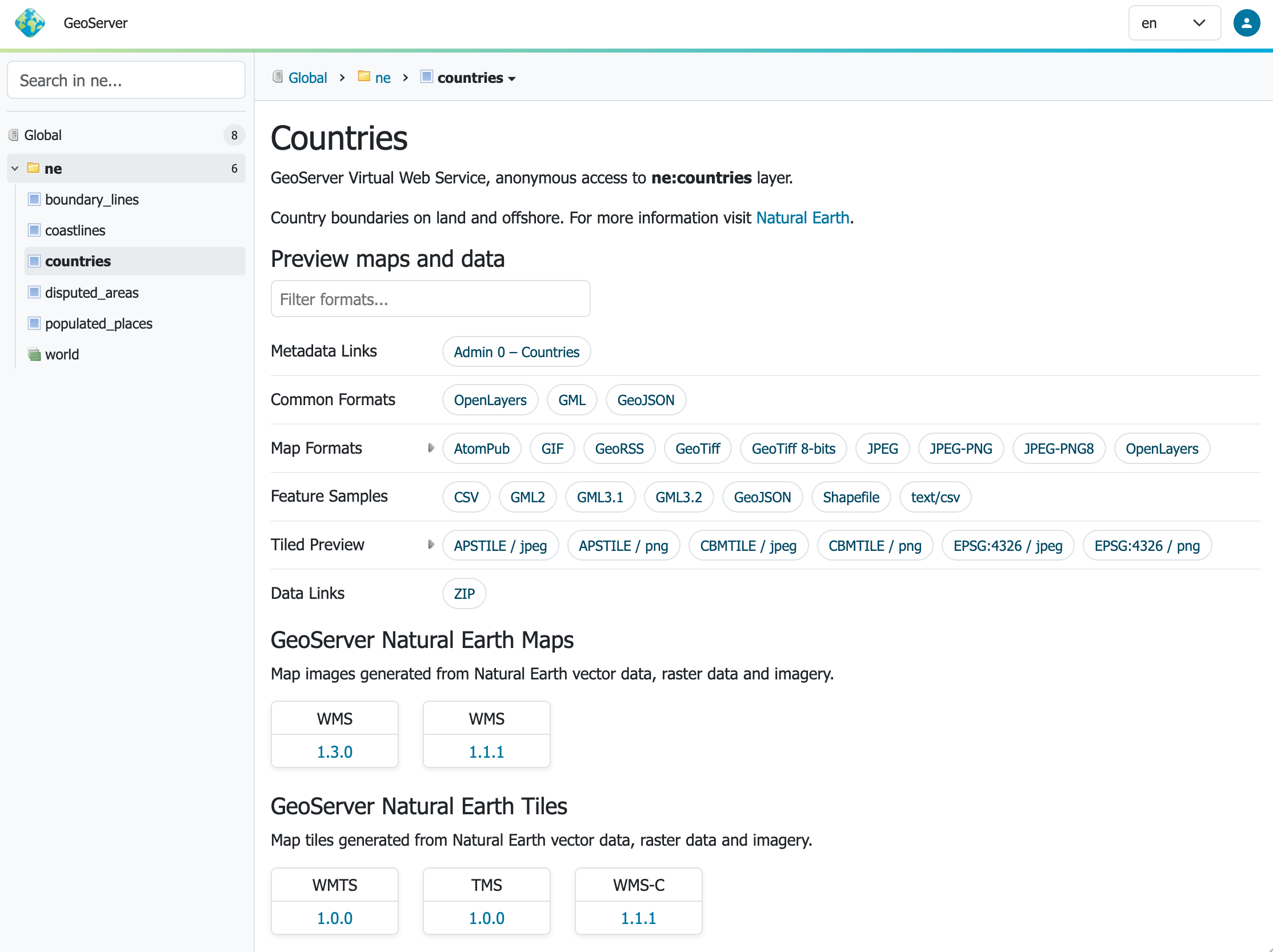
Page: Page content adjusts to the current context. The welcome page adjusts to showing the layer tile and description, along with preview links, sample data downloads, metadata and data links configured.
A really nice addition is the ability to filter the output formats to quickly find the link you are looking for.
-
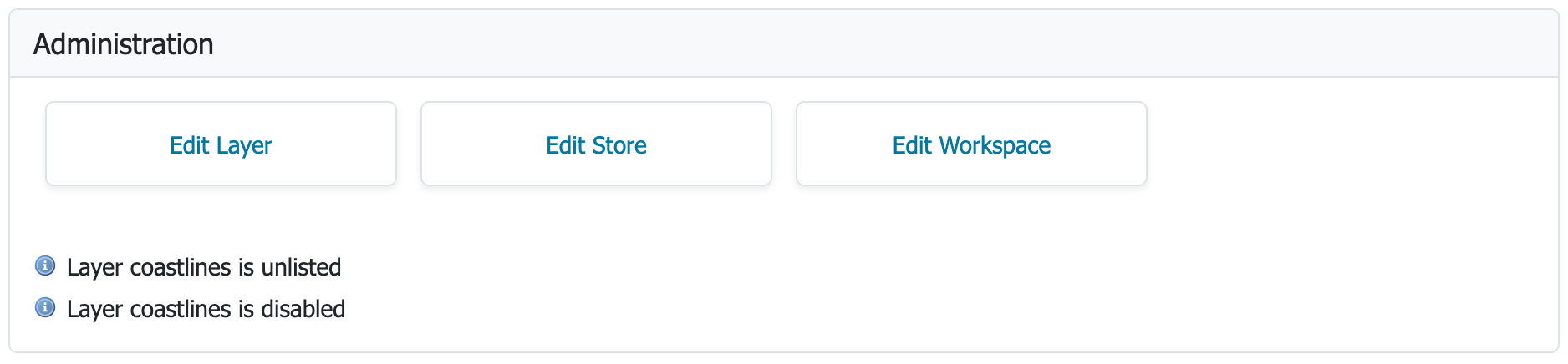
Feedback: Admins are provided additional context-menu commands, and per-layer feedback and shortcuts, making the application easier and faster to use.
-
Menu: The menu bar at the top of the page provides login on the right hand side, and access to the familiar GeoServer top-level navigation menus.

For more information see the user guide.
Thanks to Stefano Bovio (GeoSolutions), Jody Garnett (GeoCat), and others for this major improvement.
New User Interface Responsive Design Theme
GeoServer now provides a responsive-design theme:
-
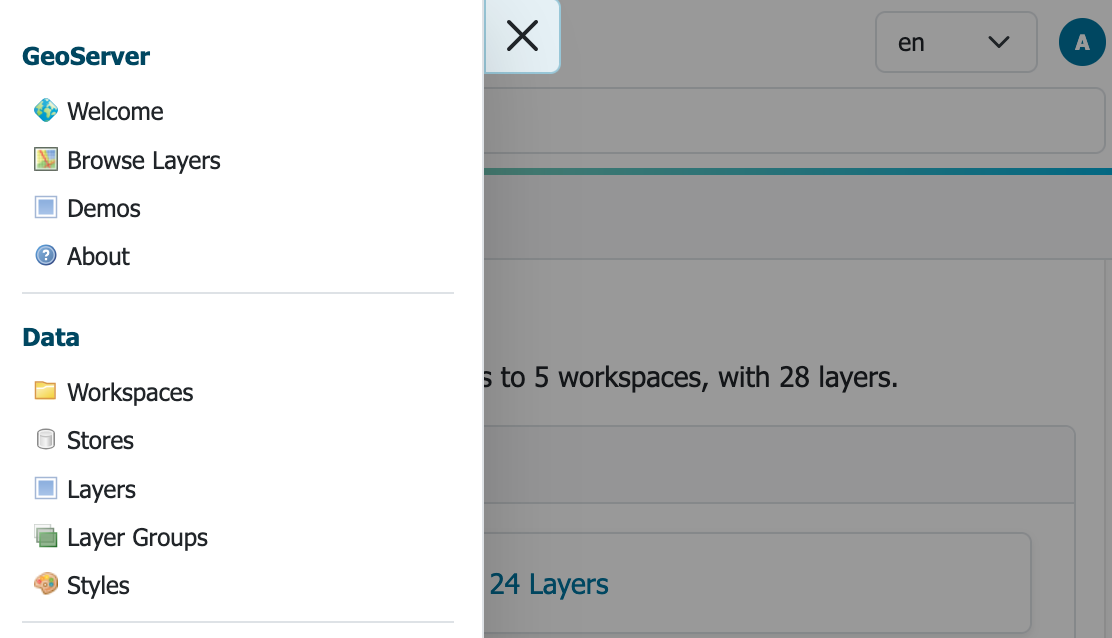
Navigation: Navigation is reduced to a hamburger menu when using a narrow width display.
-
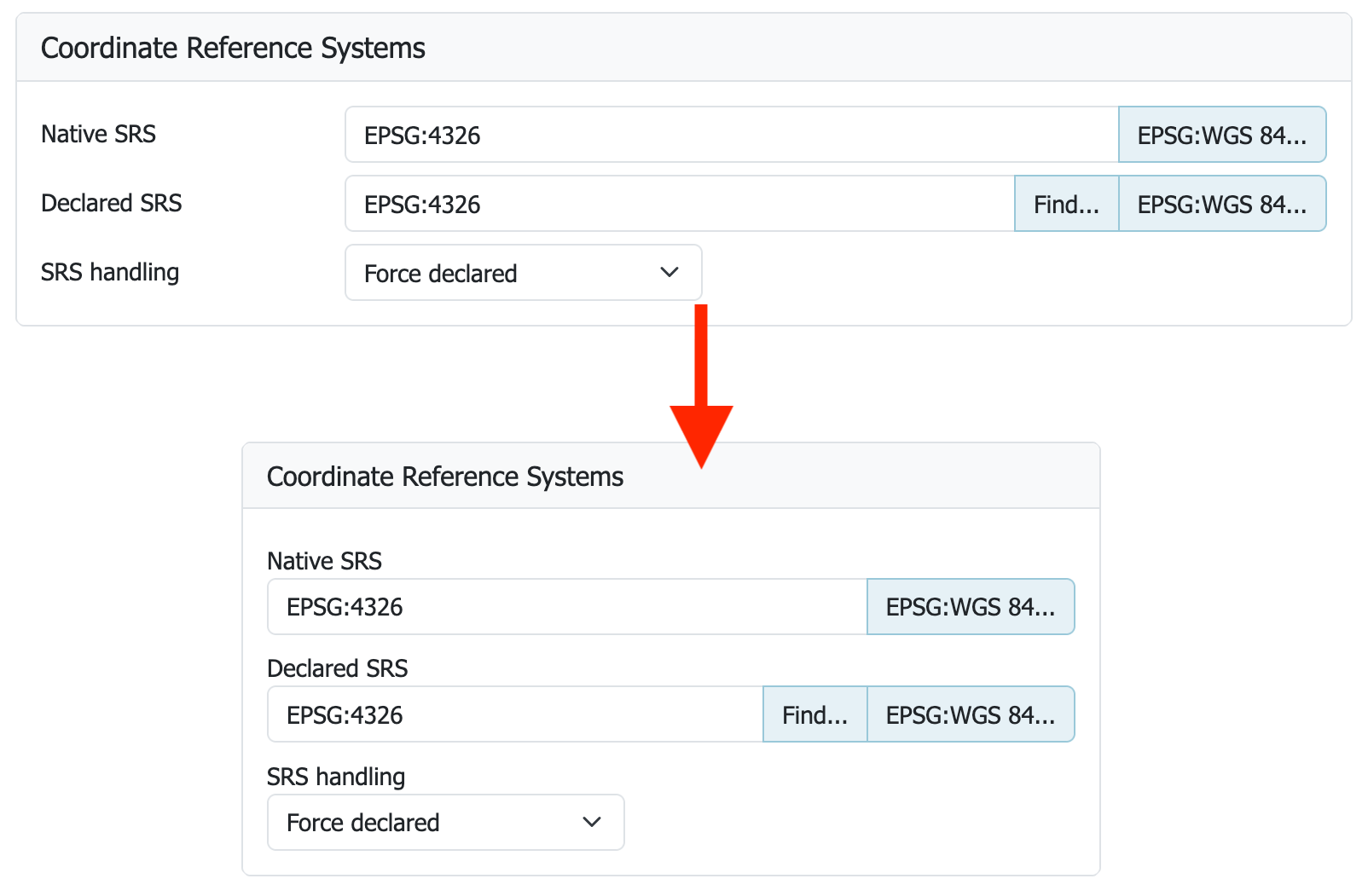
Forms: Forms have adopted a two-column layout adapting to page width.
-
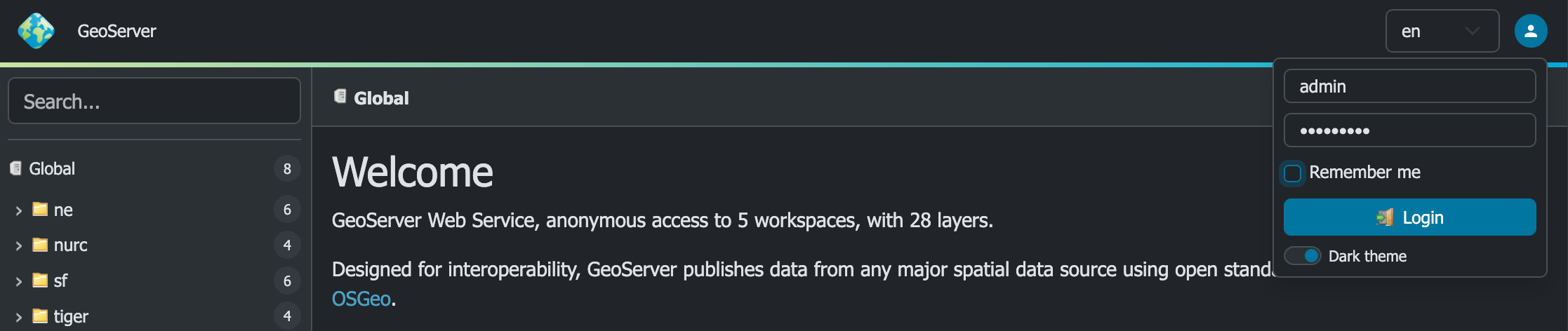
Dark Mode: The login menu includes a much requested dark mode setting.
Thanks to Stefano Bovio (GeoSolutions) for leading this frequently requested improvement, the entire GeoServer 3 team for implementing and checking, and testers at AfriGIS and GeoCat for verifying and updating screenshots.
New Layer Preview
A new full-screen layer preview is provided using the latest OpenLayers library.
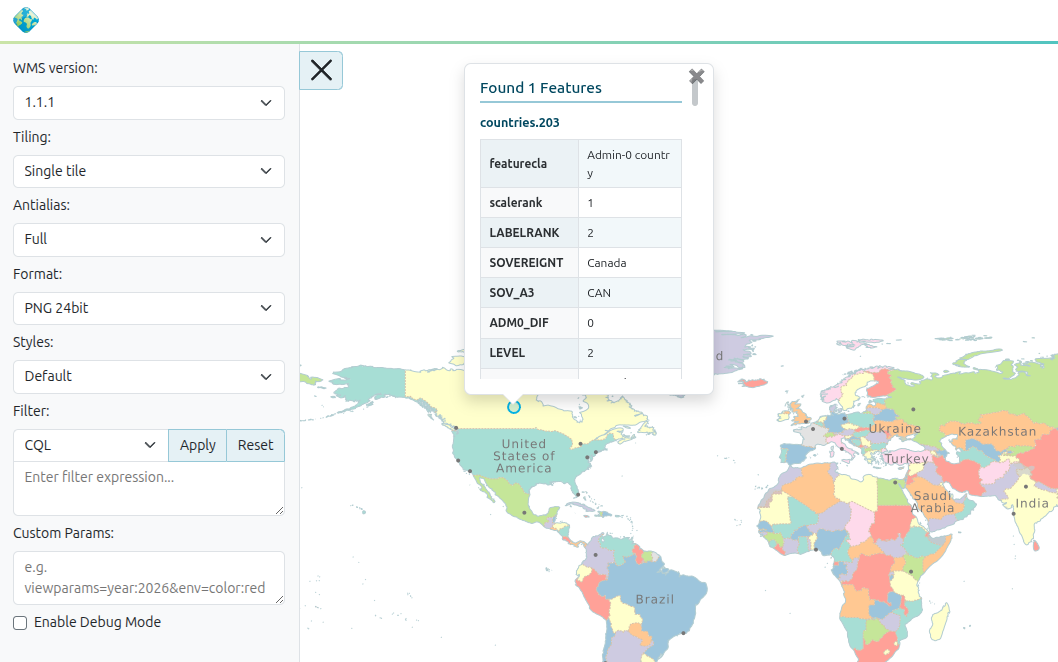
Thanks to Stefano Bovio (GeoSolutions) for the welcome improvement.
Updated Environment
GeoServer 3 requires Tomcat 11.0.x and Jetty 12.1 application servers. We are really pleased with this accomplishment after completing our transition to Spring Framework 7 and Jakarta EE Servlet API 6.1.
We have been extensively testing GeoServer 3 with Java 17 and Java 21, maintaining the same Java runtime baseline as GeoServer 2.28.x. Java 25 is subject to automated testing, but we are going to hold off recommending it until the user community has had an opportunity to try it out and report back.
If you are wondering about the compatibility between the Java web stack and GeoServer, here is a table showing the various supported options:
| GeoServer | Java | Tomcat | Jetty | Java EE | Jakarta EE |
|---|---|---|---|---|---|
| GeoServer 3.0 | 17, 21 | Tomcat 11.0.x | Jetty 12.1 | Servlet API 6.1 | |
| Not supported | Tomcat 10.1.x | Jetty 12.0 | Servlet API 6.0 | ||
| Not supported | Tomcat 10.0.x | Jetty 11.0 | Servlet API 5.0 | ||
| GeoServer 2.28.x | 17, 21 | Tomcat 9.x | Servlet API 4 | ||
| GeoServer 2.28.x | 17, 21 | Jetty 9.4 | Servlet API 3.1 |
For more information see container considerations.
Thanks to the entire GeoServer 3 team and crowdfunding campaign for this major accomplishment, representing the completion of Milestone 3.
OAuth2 OpenID Connect Extension
The new OAuth2 OpenID Connect Security Integration (OIDC) plugin is now an official extension.
The transition to Spring Security 7 was one of the big tasks accomplished for GeoServer 3. This work includes the creation of a new OIDC plugin. The new plugin has taken over the responsibilities of previously available Keycloak and OAuth2 plugins.
For guidance on upgrading please see the detailed migration guide.
Thanks to Alessio Fabiani and others for this important improvement. Special thanks to everyone who provided feedback and testing during the 3.0-RC timeframe, your success has allowing this module to graduate to full extension for 3.0.0 release.
New Documentation
The long-awaited transition to Markdown documentation has finally arrived. Welcome to our new User Manual. The GeoServer 2.x documentation is available using the version switcher at the top of the page.
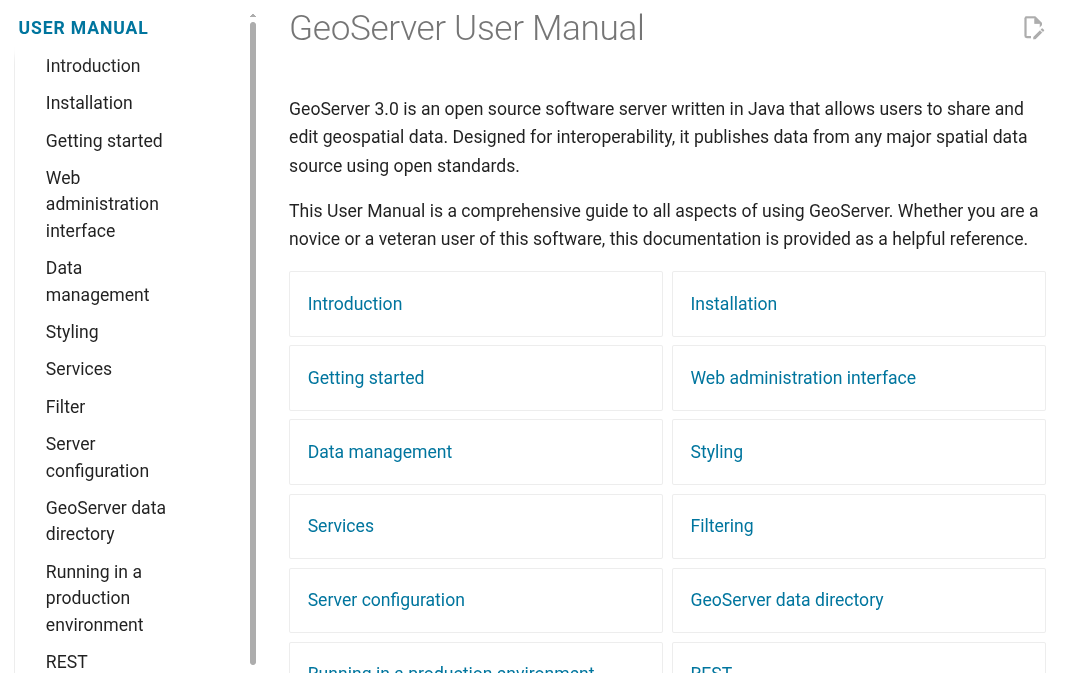
Please help out by fixing any remaining small issues or log an issue for Peter to address. The documentation guide has been updated with Markdown guidance complete with visual examples.
Thanks to Peter Smythe (AfriGIS) and Jody Garnett (GeoCat) for working on this activity which ended up being an incredible amount of work.
Pending Community Modules
The documentation contains a new heading for pending community modules that are seeking public use and support in order to graduate to an extension.
A pending community been declared ready for feedback by the development team responsible and is available for general download alongside each release. The user manual indicates what specific support is needed for the module to be ready for production as a full extension.
Release notes
New Feature:
- GEOS-12063 GSIP-238 - GeoServer 3 UI / UX Refresh
- GEOS-12132 GSIP 239 ‐ Promote OIDC Community Module to Extension
Improvement:
- GEOS-11581 Set up leaner attribute transformations when attribute customization is enabled
- GEOS-11886 Sort entries in all .properties files alphabetically
- GEOS-11918 CVE-2025-52465 Arbitrary file write vulnerability in Master Password Dump Page
- GEOS-12015 Switch tests using H2 to GeoPackage
- GEOS-12023 Improve developer logging during catalog resources loading and WMS capabilities requests
- GEOS-12024 Add Git branch name in GEOSERVER_NODE_OPTS
- GEOS-12070 REST Support for CRSs
- GEOS-12072 Remove deprecated REST endpoint on the DataStoreFileController
- GEOS-12077 Remove H2/DB based index and binary index from CoverageMultidim/NetCDF stores
- GEOS-12081 Update MapML.js (
custom element suite) to v0.17.0 - GEOS-12082 CoverageStore - quick fail for incorrect files
- GEOS-12083 Skip brute force login delays when checking for default administrator password
- GEOS-12103 Reduce contention in concurrent requests
Bug:
- GEOS-10509 WFS Request fails when XML POST body is larger than 8kB
- GEOS-10877 [B/R Community Module] Restore Tasklet always fails on resources validation
- GEOS-11777 CVE-2024-45747 Server-Side Template Injection (SSTI) vulnerability in processing FreeMarker templates
- GEOS-11903 WPS does not respect raw response output selection when there are multiple outputs
- GEOS-11916 Data directory migration performed on built-in default security configuration
- GEOS-11920 CVE-2025-58175 Server-Side Request Forgery (SSRF) Vulnerability in XML entity resolution
- GEOS-11926 ogcapi plugin makes WFS advertising an outputFormat which is actually unavailable
- GEOS-11930 OGC-API extension breaks security REST API
- GEOS-11942 ImagePPIO does not run any longer
- GEOS-11964 Metadata Bulk Operations: wicket error
- GEOS-11965 KMZ export incorrectly references remote icon URLs instead of embedding them in the KMZ archive
-
GEOS-11981 POST /security/authproviders 400: Unsupported className - GEOS-11988 Fix bug: preserve metaTilingThreads=0 in saneConfig()
- GEOS-11999 The version of Jetty (12) no longer supports web.xml CORS configuration
- GEOS-12043 CVE-2025-27511 JNDI Vulnerability in DB2 Store Connection
- GEOS-12065 WMS Layer REST PUT always returns 500 due to Collections.emptySet() in getRemoteStyleInfos()
- GEOS-12073 Remove log location configuration from Admin Console and REST API
- GEOS-12084 TemplateController REST endpoints accept non-existent workspace, store, and resource names
- GEOS-12085 LocalSettingsController does not validate workspace existence
- GEOS-12092 DescribeFeatureType fails to render a single option restriction in JSON format
- GEOS-12112 OIDC OAuth2 login principals should also expose GeoServer user properties
- GEOS-12114 GeoServer fails to start on FIPS-enabled system due to unsupported SHA1PRNG SecureRandom
- GEOS-12115 Jetty 12.1.9 is not parsing Windows working directory settings
- GEOS-12118 ReprojectingFeatureCollection can fail with ClassCastException while inserting CompoundCurve via WFS-T
Task:
- GEOS-11941 Clean up Java 17 javadoc warnings
- GEOS-11987 ImageN 0.9.1 migration requires renaming of registryFile.jai to registryFile.imagen
- GEOS-12004 Make WMS indepependent of WFS
- GEOS-12005 Remove GeoServer H2 extension
- GEOS-12006 GWC, removal of leftover H2 references
- GEOS-12011 Move KML module to extension
- GEOS-12016 Move WCS 1.1 module to extension
- GEOS-12017 Move WCS 1.0 to extension
- GEOS-12018 Switch GeoServer tests away from H2
- GEOS-12019 Turn arcgrid and worldimage formats into plugins
- GEOS-12025 Split WMS 1.1 and 1.3
- GEOS-12040 Updating BouncyCatle libraries to LTS 2.73.10
- GEOS-12041 Update Spring LDAP to 4.0.1
- GEOS-12064 CSS: add documentation for localized @title and @abstract metadata
- GEOS-12071 Remove the WPS remote module
- GEOS-12110 Make use of XMLUtils for better integration with GeoTools.getEntityResolver()
- GEOS-12136 IOTestUtils.createRandomDirectory() replacing mkdir call to more recent java.nio.files API
- GEOS-12137 Update OSHI from 6.8.2 to 7.3.0
Sub-task:
- GEOS-12066 Present keywords as a table
- GEOS-12067 Add Full Screen OpenLayers 10.8.0 layer preview
- GEOS-12086 Keyboard navigation for file browser
For the complete list see 3.0.0 release notes.
Community Updates
Community module development:
- GEOS-11904 OGC API Processes: add support for envelope input/output
- GEOS-11905 OGC API processes status response lacks jobid and links to self
- GEOS-11906 OGC API Processes: use correct error code for access to results when execution is not complete
- GEOS-11907 OGC API Processes: support multiple raw responses
- GEOS-11908 OGC API Processes page should be pageable
- GEOS-11909 Add support for OGC API Echo process
- GEOS-11915 OGC API Processes: improve support for binary input and output
- GEOS-11972 GSIP 233 - Community Pending Release Profile
- GEOS-11980 Add support for uploading a single parquet file to GeoServer via REST
- GEOS-11983 GSR /query fails with HTTP 500 when where parameter is empty
- GEOS-12000 Ignore DescribeFeatureType requests without typeName in Features Templating schemas override
- GEOS-12002 hz-cluster: homepage pop-up fails
- GEOS-12007 Add AWS credential chain authentication UI and documentation for GeoParquet
- GEOS-12013 Support vector datasets ingestion in VectorMosaic via REST
- GEOS-12044 STAC search endpoint should report invalid collection names as invalid parameters instead of internal errors
- GEOS-12061 New Community Module for PNG-WIND output format for wind datasets
- GEOS-12062 Add DuckDB datastore community extension (gs-duckdb)
- GEOS-12069 Align the hazelcast version in hz-cluster to the rest of GeoServer
- GEOS-12074 Remove activeMQ-broker community module
- GEOS-12089 GWC sqlite community module breaks legend preview in style page
- GEOS-12098 Rename JWT Header assembly so it is collected for nightly downloads
- GEOS-12101 Workspace styles not persisted to disk after restore
- GEOS-12119 Workspace-scoped OGC API Styles endpoint returns styles from other workspaces
- GEOS-12129 Longitudinal profile positive altitude includes first elevation as ascent from zero
Community modules are shared as source code to encourage collaboration. If a topic being explored is of interest to you, please contact the module developer to offer assistance.
About GeoServer 3.0 Series
Additional information on GeoServer 3.0 series:
- GeoServer 3.0 User Manual
- GeoServer 3.0-RC, a crowdfunded success story
- GSIP-221 MkDocs Migration
- GSIP-226 GeoServer 3
- GSIP-233 Community Pending Profile
- GSIP-236 Lightening up the Core for GeoServer 3
- GSIP-238 UI / UX Refresh
- GSIP 239 Promote OIDC Community Module to Extension
 Atom feed